 Loop Forge
Generated canal clip at 2x
Works, from LTX 2.5 Creative Lab LoRAs, tested locally
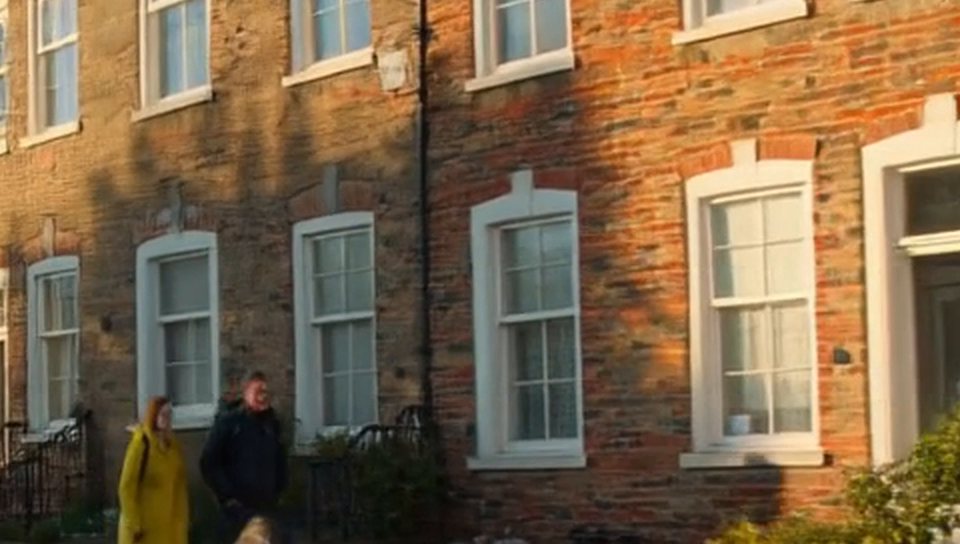
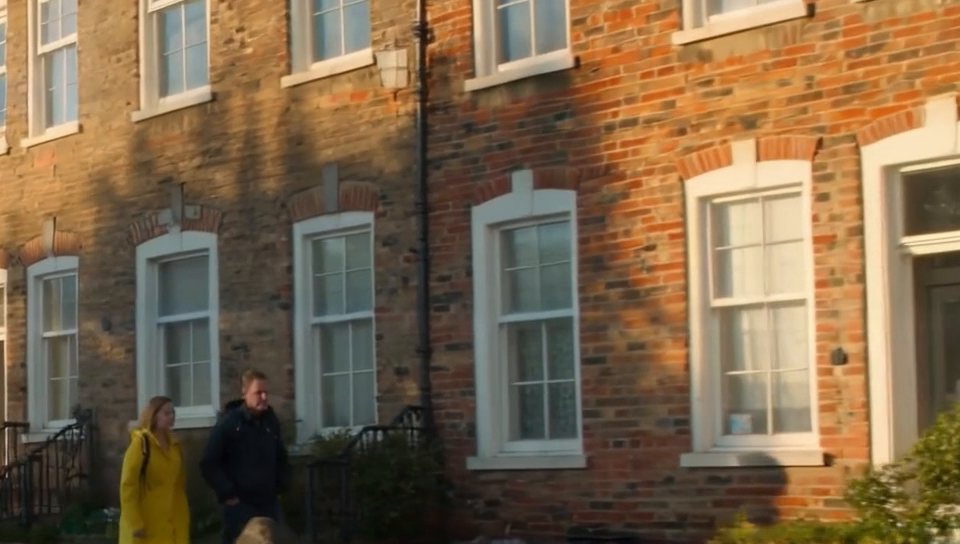
- LoRA
- Refine Details at 1.0
- Output
- 1920×1088, 121 frames at 24fps
- Sampling
- 8 steps, euler
- Seed
- 42
- Generated in
- 22 min
- Peak VRAM
- 10.9 GiB
- Ran on
- RTX 3060, 12GB (local)
What was wired in

I took a 960×544 clip generated with LTX 2.5 up to 1920×1088. Both frames show the same 960×544 crop, one from a plain lanczos upscale and one from Refine Details. The brickwork, the window bars and the faces have real texture in the refined version, where the plain upscale is smeared.
sharp photographic detail, crisp natural texture, fine surface detail, clean edges, natural film grain, high resolution footage
blurry, soft, plastic, smeared detail, oversharpened halos, warped faces
Notes
Refine Details is for footage that is clean but soft, such as LTX output. Deblur is for footage that is out of focus, and Decompression is for blocky, compressed footage.
The crops were cut after generation. The workflow produces the full 1920×1088 clip.
Run it yourself
Download everything for this test (.zip, 1.6 MB). It holds the workflow, every input it loads and a README. Copy the inputs into ComfyUI/input, put the models below in place and drag the workflow onto ComfyUI.
| File | Put it in | Size |
|---|---|---|
| ltx-2.5-22b-distilled-transformer-comfy-int8-convrot.safetensors gated | models/diffusion_models | 21.5 GB |
| gemma4-12b-with-proj-ltx-2.5-comfy-int8-convrot.safetensors gated | models/text_encoders | 15.4 GB |
| ltx-2.5-audio-vae-bf16.safetensors gated | models/vae | 364.9 MB |
| ltx-2.5-video-vae-bf16.safetensors gated | models/vae | 1.5 GB |
| ltx-2.5-22b-ic-lora-refine-details-1.0.safetensors gated | models/loras | 1.3 GB |
The Lightricks repositories (the LTX 2.5 base model and the LoRAs) are gated. Log in to Hugging Face and accept the terms on each repository page before downloading.
Custom nodes: ComfyUI-LTXVideo at commit 3bf3ca6. Everything else is part of ComfyUI 0.37.0 (commit 0f74f7fb, frontend 1.53.6).